How do I set up a Staff Member who is also a Parent, using the same Email Address?
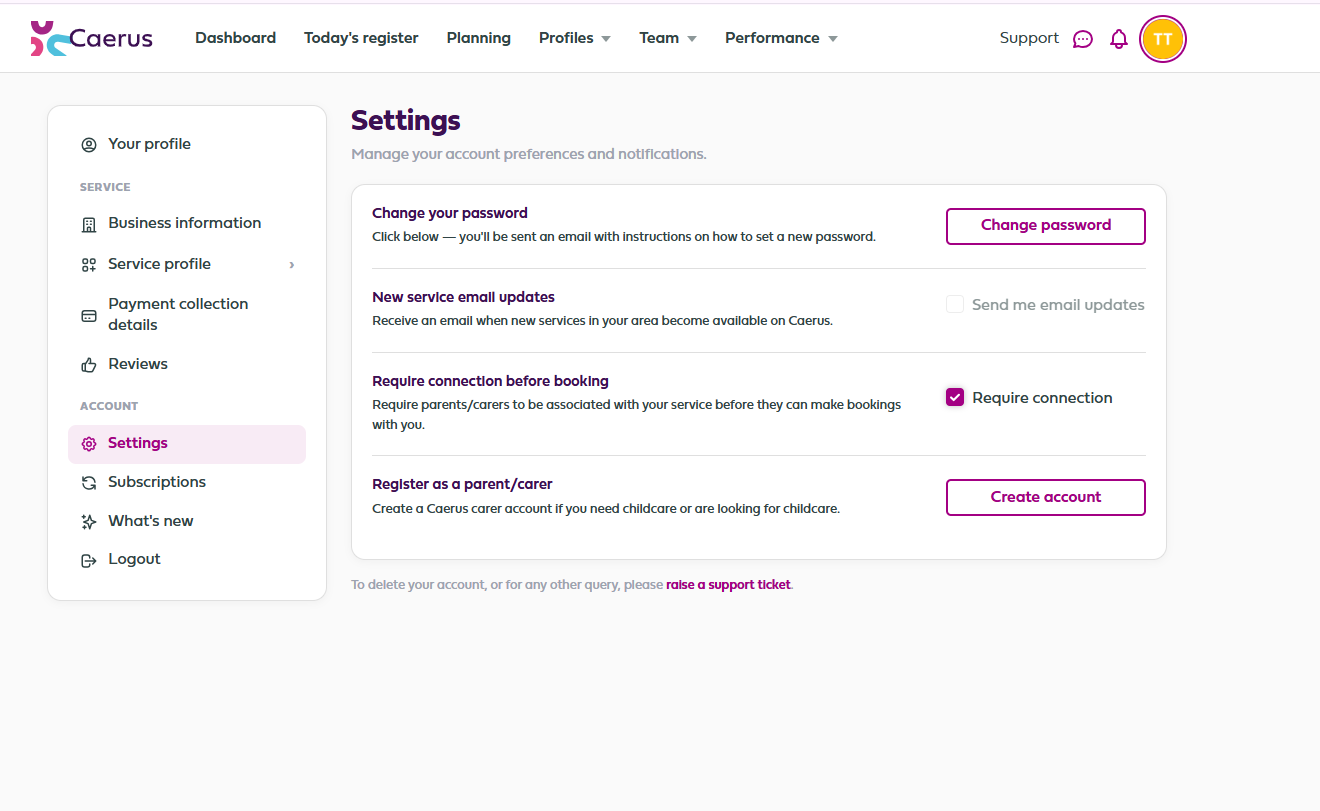
If you have a staff member who is also a parent, you should set up the staff account first. The staff member will then be able to log into their account, go to settings and then select Register as a Parent.
Once they have done this they will be able to switch from a staff account to a parent account and vice versa.
Related Articles
How Does A Parent Register on Caerus
To register as a parent/carer on Caerus, firstly follow this link: https://app.caerus.scot/auth/login Click on the Profile tab as shown below: Add the email address you will be using to access your Caerus account You will then be asked to add your ...
How Do I Add Split Shifts on the Rota?
Go to the rota section Select the day you want to add staff to Tick to select the staff member you want to add the Split Shift to Add the first shift they are working Click on the + sign Add the second shift they are working This method also works if ...
Caerus Overview
PARENT USER GUIDE BACKGROUND INFORMATION File: https://support.caerus.scot/portal/en-gb/kb/articles/caerus-overview CONNECTING TO A SERVICE https://support.caerus.scot/portal/en-gb/kb/articles/connecting If you have not connected, this is what will ...
How Do I Connect to a Service
CONNECTING TO A SERVICE Once you have registered, which you can do here: https://app.caerus.scot/auth/login and added your and your child’s details onto Caerus (please make sure you add your full address and not just your postcode, it is not always ...
Viewing My Child's Bookings
The Caerus calendar and bookings list functionality is a fantastic way of keeping up to date with your children's bookings. Did you know, you can view all their bookings in the one place? Here is a step by step guide to viewing your child's bookings ...